
Notice of Product End of Life:
Unfortunately, due to several components becoming obsolete we were no longer able to keep up the production of the Logic16 unit, and had to stop its production. We will keep these pages about the Logic16 alive for information and archival purposes.
Together with our partner, DotFast Consulting (Austria), will be more than happy to discuss further Time-tagging needs with you.
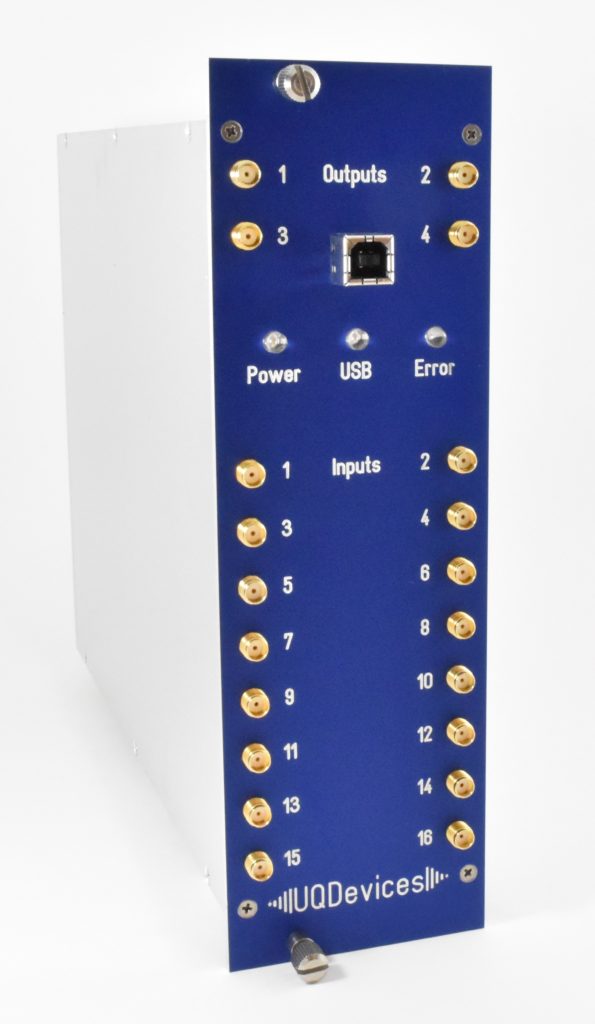
The Logic16 is a logic correlation unit designed to be the most versatile tool available for analyzing photon detection signals in multi-photon correlation counting and time-resolved signal analysis. It operates in two distinct modes for measurement flexibility: coincidence counting mode and time-tagging mode.
Coincidence counting
Logic16’s proprietary on-board coincidence counting algorithms enable users to:
- Count ALL possible coincidence patterns for up to 16 inputs (over 43 million, simultaneously)
- Set inputs to coincidence active, inactive, or ignore
- Use Logic16 with even small, low-power computers since all time-correlation processing is performed internally
Added value for experiment integration
- Flexibility. Users can switch in-lab between Configuration A ( 156 ps resolution, 16 operational channels) and Configuration B
(78 ps resolution, 8 operational channels). - Output pulses triggered by user-selected coincidence pattern detection
- Programmable-delay output pulses
- Versatile pulse generator
- Synchronization of multiple units
- Convenient USB 2.0 interface (11 Mtags/s)
Timetagging
Logic16 time-tagger and time-tag filter enable users to:
- Perform continuous time-tagging over long periods of time (see an implementation using Logic16 to record for 20h [paper citation]
- Perform gated time-tagging
- Employ a time-tag filter to record only those time-tags where a set number of detections have occurred
- Measure with sustained data rates up to 190 MHz by employing a time-tag filter †
- Avoid burdening the host PC with excessively large raw data files that make analysis and post-processing a chore
- Mask inputs of choice from the time-tag filter, allowing select signals (e.g., for timing or synchronization) to pass unfiltered
Specifications
| Configuration A | Configuration B | |
| Number of accessible channels | 16 | 8 |
| Time bin, digital | 156 ps | 78 ps |
| Tunable (multi-hit) delay | ≤+40 μs†† | ≤+20 μs†† |
| On-board coincidence count rate | 100 MHz | 100 MHz |
| On-board time-tag rate (per channel, burst of 1024 events) | 200 MHz | 200 MHz |
| Max. data transfer rate | ~ 11MHz††† | ~ 11MHz††† |
| Max. sustained (time-tag) data rate | 190 MHz† | 190 MHz† |
Shipping information: weight (approx.) 4 lbs; dimensions (approx.) 16″ x 12″ x 4″
† The time tagger operates with a 190 Mtag/s burst rate. So long as detection events occur at ≤ 11MHz (i.e., the USB 2.0 limited transfer rate), this 190 MHz rate can be leveraged
††This maximum delay time is dependent on the buffer, which can store 1024 events/channel over this time period. In other words one can measure events at 25 MHz (50MHz) @ 40 μs (20 μs) delay – and at higher rates for shorter delays.
†††As expected with optimized code (e.g., C++) on a host PC with USB 2.0 interface.
Software and drivers
Please go to the [software] page to download the latest software and drivers.
Logic16 comes with .NET and C++ drivers for Windows and Linux drivers for direct control of the unit using Matlab, Labview, Python, MS visual studio and C++.
Simple program examples using .NET and C++ are available to download from then [software] page. For instructions on how to use the examples please use the pdf documents from the [Documentation] page.
Correlation Counter (Windows only)
For a quick start in the lab, perform coincidence counting and record data with the UQD Correlation Counter:
- Set channel parameters (threshold, polarity, delay)
- Set coincidence patterns for counting
- Save data in CSV format
- Save and reload parameter settings for later use
- Obtain timing histograms
Timetag Explorer (Windows only)
Test installation and operation of the Logic16 on a host computer and debug setup integration using the Timetag Explorer.
- Test and verify all possible input configurations and settings
- Check data acquisition and coincidence counting
- Save time-tag files at high speed